
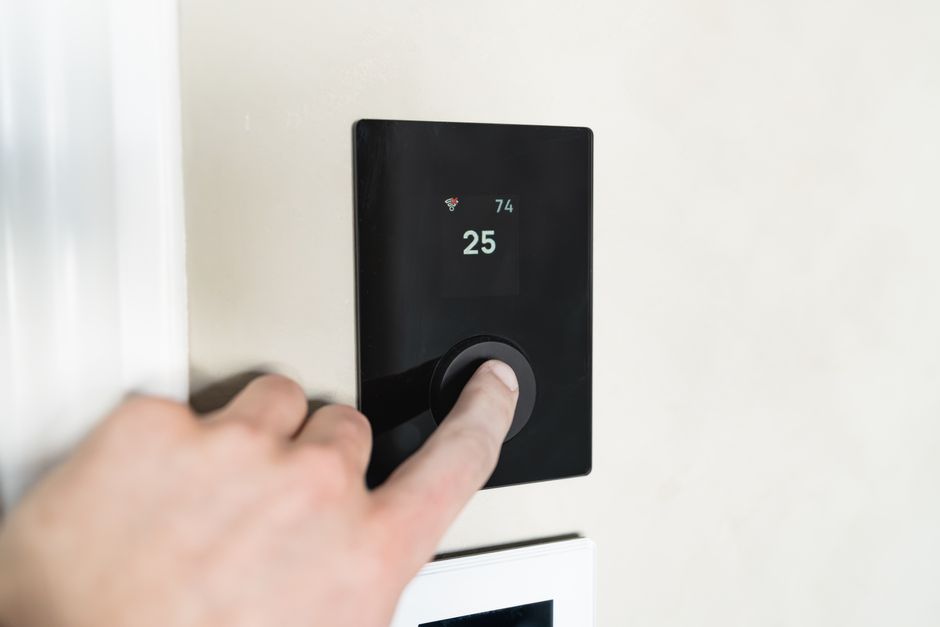
What to Do When Your Thermostat Is Not Working
A thermostat not working is one of the most frustrating things a homeowner can face, especially in the middle of a scorching Texas summer or an unexpected winter cold snap. One moment your home is comfortable, and the next your AC has gone silent or your heat refuses to kick on. Before you panic or pick up the phone, the good news is this: most thermostat problems have simple explanations and straightforward fixes.
Here are the most common reasons your thermostat may have stopped working:
| Problem | Most Likely Cause | Quick Fix |
|---|---|---|
| Blank or dark screen | Dead batteries or tripped breaker | Replace batteries or reset breaker |
| Heat or AC won’t turn on | Wrong mode or temperature setting | Switch to HEAT/COOL, raise or lower setpoint |
| Thermostat clicks but nothing happens | Equipment-side failure (contactor, control board) | Call a professional |
| Wrong temperature reading | Poor placement near sunlight or vents | Relocate or recalibrate thermostat |
| Smart thermostat offline | Wi-Fi issue or missing C-wire | Reconnect Wi-Fi, check C-wire |
| System short cycling | Dirty air filter or sensor issue | Replace air filter, check placement |
The thermostat is the brain of your entire HVAC system. It constantly reads your indoor temperature and signals your furnace, heat pump, or air conditioner to maintain the temperature you set. When something goes wrong with it, the effects ripple through your whole home. But here’s the important distinction most homeowners miss: what looks like a thermostat problem is sometimes actually a system-level issue with the furnace or AC unit itself.
In North Texas, where summer heat regularly pushes past 100°F and winter nights can drop below freezing, a thermostat failure is not just an inconvenience. It can become a genuine comfort and safety issue fast. Whether you are dealing with a completely dead screen, a system that says “heat on” but blows cold air, or a smart thermostat that has lost its Wi-Fi connection, this guide walks you through how to diagnose the problem, what you can safely fix yourself, and when it is time to call in a certified HVAC technician.
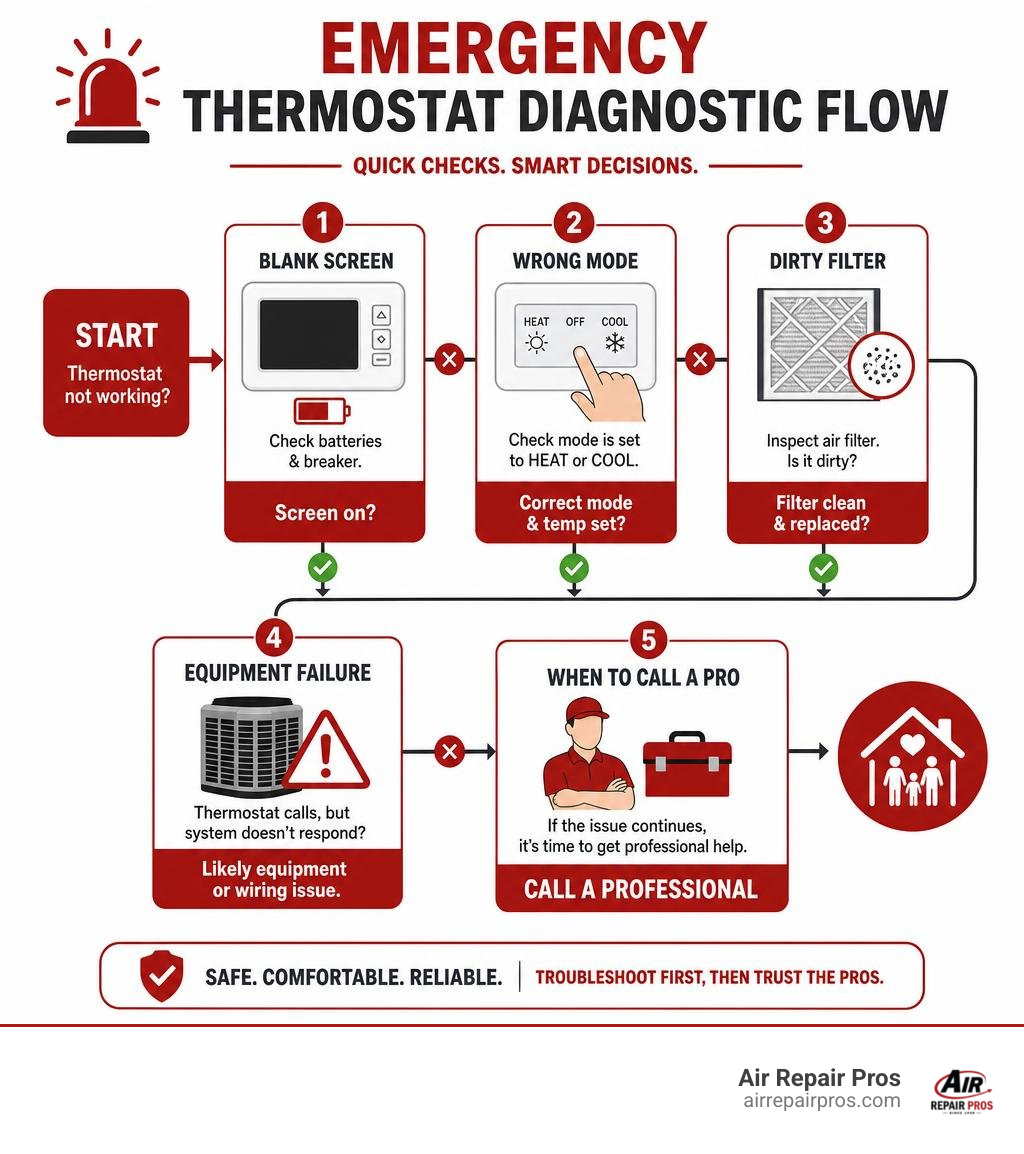
Common Reasons for a Thermostat Not Working
When you walk over to your wall control and find your thermostat not working, the issue usually boils down to a few common culprits: power loss, incorrect settings, or a communication breakdown between the device and your HVAC equipment.
If your digital screen is completely dark, it generally indicates that the device has lost its electrical connection. For smart models, this can cause the system to freeze up entirely during a background software update. If you need step-by-step guidance on resolving a frozen display or a system that has lost power, it is best to consult the manufacturer’s troubleshooting manual for your specific model.

Checking the Power Supply and Batteries
The very first step in troubleshooting is to check how your thermostat gets its power. Many digital and programmable thermostats rely on simple alkaline batteries, typically AA or AAA, to keep their screens lit and retain their settings. Even if your system is hardwired to your home electrical grid, it likely uses batteries as a memory backup. When these batteries die, the screen goes blank, and the thermostat can no longer signal your AC or heater to run.
If replacing the batteries does not bring the screen back to life, the problem is likely further up the line. Your HVAC system and its thermostat operate on a dedicated electrical circuit. Go to your home electrical panel and check for a tripped circuit breaker or a blown fuse. If the breaker labeled for your heater or air conditioner is tripped, flip it completely to the “off” position and then back to “on.”
Additionally, many modern systems feature an integrated safety switch. This switch is often tied to your condensate drain pan. If your AC drain line clogs and water backs up, the safety switch trips and cuts all power to the thermostat to prevent water damage to your home. If you suspect a deeper electrical problem is keeping your screen dark, read our guide on how to handle a broken AC thermostat for more specialized diagnostics.
Verifying System Settings and Modes
It sounds simple, but incorrect settings are responsible for a surprising number of service calls. If you live in a multi-person household, someone else may have adjusted the temperature or changed the system mode without your knowledge.
Start by verifying that the thermostat is explicitly set to the mode you want: either HEAT or COOL. If the system is set to “Off” or “Fan Only,” the blower fan may run, but you will not get any conditioned air. Next, check the temperature setpoint. To force the system to kick on for a test, adjust the target temperature at least three to five degrees beyond the current room temperature. If you want heat, set it higher, if you want cooling, set it lower.
Additionally, check your programmable schedule or smart settings. Features like “Away Mode,” “Eco Mode,” or automated schedules can override your manual adjustments and make it seem like the thermostat is ignoring your commands. If your system seems to struggle particularly during seasonal transitions, you can find helpful advice in our article on resolving thermostat temperature problems in winter.
How to Diagnose System-Level HVAC Issues vs. Thermostat Faults
A challenge for homeowners is determining whether the thermostat itself is broken or if the furnace or AC unit is experiencing a mechanical failure. A classic sign of this confusion is when the thermostat screen displays “Heat On” or “Cool On,” but only room-temperature air blows out of your vents, or the system remains completely silent.
To isolate the issue, start by checking your indoor air filter. A heavily clogged air filter restricts airflow, which causes your furnace heat exchanger to overheat or your AC evaporator coils to freeze. When this happens, safety limit switches inside the equipment automatically shut down the system to prevent a fire or compressor damage. This safety shutdown occurs independently of the thermostat, leaving your wall control calling for heating or cooling while the actual equipment is locked out.
According to the U.S. Department of Energy, replacing a dirty filter can improve your system efficiency and prevent these sudden safety shutdowns. Keeping your filtration system clean ensures that airflow remains steady, preventing the safety switches from cutting off power to your climate control system.
Troubleshooting a Thermostat Not Working in the Winter
During a cold spell in Frisco, TX, or Plano, TX, a heating failure can quickly lead to freezing indoor temperatures and the risk of burst plumbing pipes. If your thermostat is set to heat but nothing is happening, pay close attention to what happens when you raise the temperature.
Do you hear a soft “click” from the thermostat? If you hear a click, it means the thermostat is successfully closing the low-voltage circuit to call for heat. If the furnace or heat pump fails to start after that click, the problem is almost certainly on the equipment side. This could point to a failed igniter, a dirty flame sensor, a faulty gas valve, or a tripped high-limit switch on your furnace control board. If you are dealing with a heat pump, it could indicate a failed reversing valve or an issue with the auxiliary heating strips. For professional assistance in restoring your heating during the colder months, explore our specialized thermostat repair services.
Troubleshooting a Smart Thermostat Not Working
Smart thermostats bring incredible convenience, but their advanced electronics introduce unique failure points. If your smart screen is blank or constantly rebooting, it is often due to a lack of steady power.
Unlike older models that can run for years on a couple of AA batteries, smart thermostats require a constant stream of 24-volt AC power. This is delivered via the common wire, or “C-wire.” If your home has older wiring that lacks a C-wire, your smart thermostat may try to “steal” power from the heating or cooling wires when the system is running. Over time, this power-stealing method can drain the internal battery, causing the thermostat to drop offline, lose its Wi-Fi connection, or fail to trigger your HVAC system.
Software and connectivity glitches can also mimic hardware failures. If your thermostat is unresponsive, try performing a soft reset through its settings menu or by removing the display from the wall plate for 30 seconds to power cycle it. Make sure your home Wi-Fi network is active and broadcasting on a compatible frequency, as many older smart models only connect to 2.4GHz bands rather than 5GHz bands. Taking these steps can resolve most wireless communication issues and restore normal operation.
Comparing Thermostat Types and Upgrade Options
If your current wall control is outdated, constantly losing its calibration, or simply past its prime, upgrading to a modern model is a smart, cost-effective home improvement. Choosing the right type depends on your daily schedule, your comfort preferences, and how much hands-on control you want.
| Thermostat Type | Key Features | Best For | Average Lifespan |
|---|---|---|---|
| Manual / Analog | Simple physical dials or sliders; no programming | Homeowners who prefer simple, set-and-forget controls | 15 to 20+ years |
| Programmable | Allows daily/weekly scheduled temperature changes | Consistent daily routines; budget-friendly energy savings | 10 to 12 years |
| Smart / Wi-Fi | Remote app control; self-learning; energy reports | Busy families; tech-savvy users; maximum energy efficiency | 7 to 10 years |
Upgrading from a basic manual model to a programmable or smart option can dramatically improve your home comfort while lowering your monthly utility bills. To understand how scheduling your temperature adjustments can keep your energy costs in check, read about the many advantages of a programmable thermostat.
Choosing the Right Model for Your Texas Home
When selecting a new thermostat for your home in McKinney, TX, or Allen, TX, compatibility is the most critical factor. Not every thermostat works with every type of heating and cooling system. For example, if you have a multi-stage heat pump, a ductless mini-split, or a zoned system with multiple dampers, you will need a controller specifically designed to handle those configurations.
Using an incompatible thermostat can lead to inefficient operation, short cycling, or even permanent damage to your HVAC control board. Before purchasing a new device, it is always wise to consult with a professional to ensure the wiring in your walls can support your chosen model. For guidance on matching a controller to your specific setup, check out our resource on choosing the right thermostat for your home.
Safe DIY Maintenance Steps to Prevent Future Failures
Regular preventive maintenance is the best way to ensure you never have to deal with a sudden thermostat failure. Fortunately, there are several simple and safe maintenance tasks you can perform yourself to keep your system running smoothly.
First, keep the sensors clean. Over time, dust, pet hair, and spiderwebs can accumulate inside your thermostat casing, insulating the temperature sensor and causing inaccurate readings. To clean it, turn off the power to your HVAC system at the breaker, remove the thermostat cover, and gently use a soft-bristle brush or a can of compressed air to blow away any accumulated debris.
Second, check the physical placement of your thermostat. It should always be installed on an interior wall, away from direct sunlight, drafty windows, exterior doors, and supply registers. If your thermostat is located in a hallway that catches a cold breeze every time the door opens, or if it sits directly under a warm light fixture, it will read the wrong temperature and cause your HVAC system to run unnecessarily.
When to Call a Professional HVAC Technician
While changing batteries and dusting off a sensor are perfectly safe DIY tasks, some situations require the expertise of a professional. Working with low-voltage electrical wiring carries risks, and miswiring a thermostat can easily short out your furnace transformer or destroy an expensive control board.
You should always call a certified technician if you suspect a wiring issue, if your circuit breaker trips repeatedly every time your AC kicks on, or if you smell a distinct burning odor near your thermostat or furnace. Additionally, if your thermostat is working perfectly but your system is short cycling or blowing room-temperature air, a professional must diagnose deeper mechanical issues like refrigerant leaks, failed blower motors, or cracked heat exchangers. To learn more about the different systems we service, read our guide on the various types of thermostats.
Frequently Asked Questions About Thermostat Troubleshooting
Why is my thermostat screen completely blank?
A blank screen usually points to a complete loss of power. Start by replacing the batteries with fresh alkaline ones. If the screen remains dark, check your home electrical panel for a tripped breaker or check your indoor HVAC unit to see if a safety switch has tripped due to a clogged condensate drain line.
Why does my thermostat click but the heat or AC does not turn on?
The clicking sound is the physical relay inside the thermostat closing to send a 24-volt signal to your heating or cooling system. If the click occurs but nothing starts, the thermostat is likely doing its job, and the breakdown is on the equipment side, such as a failed furnace igniter, a bad compressor contactor, or a blown fuse on the control board.
Can a dirty air filter cause my thermostat to stop working?
While a dirty filter will not directly damage the thermostat itself, it severely restricts airflow. This restriction causes your HVAC system to overheat or freeze, triggering safety limit switches that shut down the equipment. The thermostat may remain powered on and call for air, but the system will refuse to run until the filter is replaced and the safety switch resets.
How do I know if my thermostat or my furnace is broken?
A simple way to test this is to perform a manual check at the thermostat. If you set the fan setting from “Auto” to “On” and the indoor blower fan immediately starts running, it proves that the thermostat has power and can communicate with the indoor unit. If the fan runs but the heat or AC refuses to start, the issue is likely with the heating or cooling components themselves.
Do smart thermostats require a C-wire to function reliably?
Yes, most smart thermostats require a dedicated common wire, or C-wire, to provide continuous 24-volt power for their Wi-Fi connections and color screens. While some models claim to work without a C-wire by using power-stealing methods, this can cause erratic system behavior, frequent reboots, and premature battery drain.
Why does my thermostat show the wrong indoor temperature?
This is typically caused by poor placement. If your thermostat is mounted near a drafty window, an exterior door, a kitchen stove, or in direct sunlight, its sensors will read localized temperatures that do not reflect the rest of your home. Dust buildup inside the casing can also insulate the sensor and cause incorrect readings.
How often should I replace the batteries in my thermostat?
You should replace your thermostat batteries once a year as a preventive measure. A great habit is to swap out your thermostat batteries at the same time you change the batteries in your home smoke detectors, or right before the start of the heavy summer cooling season.
Can a bad thermostat cause my energy bills to spike?
Absolutely. If your thermostat is poorly calibrated, it can cause your HVAC system to run much longer than necessary. Additionally, a failing sensor can lead to short cycling, which forces your system to turn on and off rapidly, consuming massive amounts of energy and putting unnecessary wear and tear on your equipment.
What is the average lifespan of a digital thermostat?
Most digital and programmable thermostats are designed to last between 10 and 12 years. Over time, the internal electronic sensors can degrade, leading to inaccurate temperature readings and communication failures. Smart thermostats may have a slightly shorter lifespan of 7 to 10 years due to their complex software and continuous Wi-Fi usage.
Why does my HVAC system turn off too quickly after starting?
This behavior is known as short cycling. It can be caused by a thermostat installed in a drafty area, a heavily clogged air filter that triggers a safety shutdown, or a temperature sensor that is dirty and misreading the indoor air temperature.
Conclusion
When your home comfort is on the line, a malfunctioning thermostat can make your living space feel unbearable in a matter of hours. While many common issues like dead batteries, incorrect settings, or a tripped breaker can be easily resolved with a little DIY troubleshooting, complex electrical and mechanical problems require professional attention to ensure your system operates safely and efficiently.
If you have gone through these troubleshooting steps and your HVAC system is still refusing to cooperate, the experienced team at Air Repair Pros is here to help. Serving Frisco, TX, McKinney, TX, Plano, TX, Little Elm, TX, and Allen, TX since 1998, we provide certified technicians and fully stocked trucks to get your home back to a comfortable temperature in a single visit. Do not stay uncomfortable in your own home. Contact our professional thermostat repair technicians today and get your system running perfectly again!